macOS Menu Bar App
Verdict

What Mac should I buy?

Verdict watches your actual workload, finds your bottlenecks, and tells you exactly which Mac to buy next. No overspending on RAM you won't use or a chip you'll never push.

Real usage data → personalized recommendations. Not guesswork.
Requires macOS 14 Sonoma or later · Apple Silicon & Intel

verdict --recommend
analyzing 7 days of usage data...
bottleneck      memory pressure   ▲ swap detected
chip_tier       base   ✓ sufficient
ram_needed      24 GB  (you use 15.2 of 16)
verdict         MacBook Air M4 24GB // skip the Pro.

Buy the right Mac.
Not the expensive one.

Verdict learns your actual workload so it can recommend the exact specs you need. No more guessing whether you need 16 or 32 GB of RAM, or if the Pro chip is worth the price.

01

Smart Recommendations

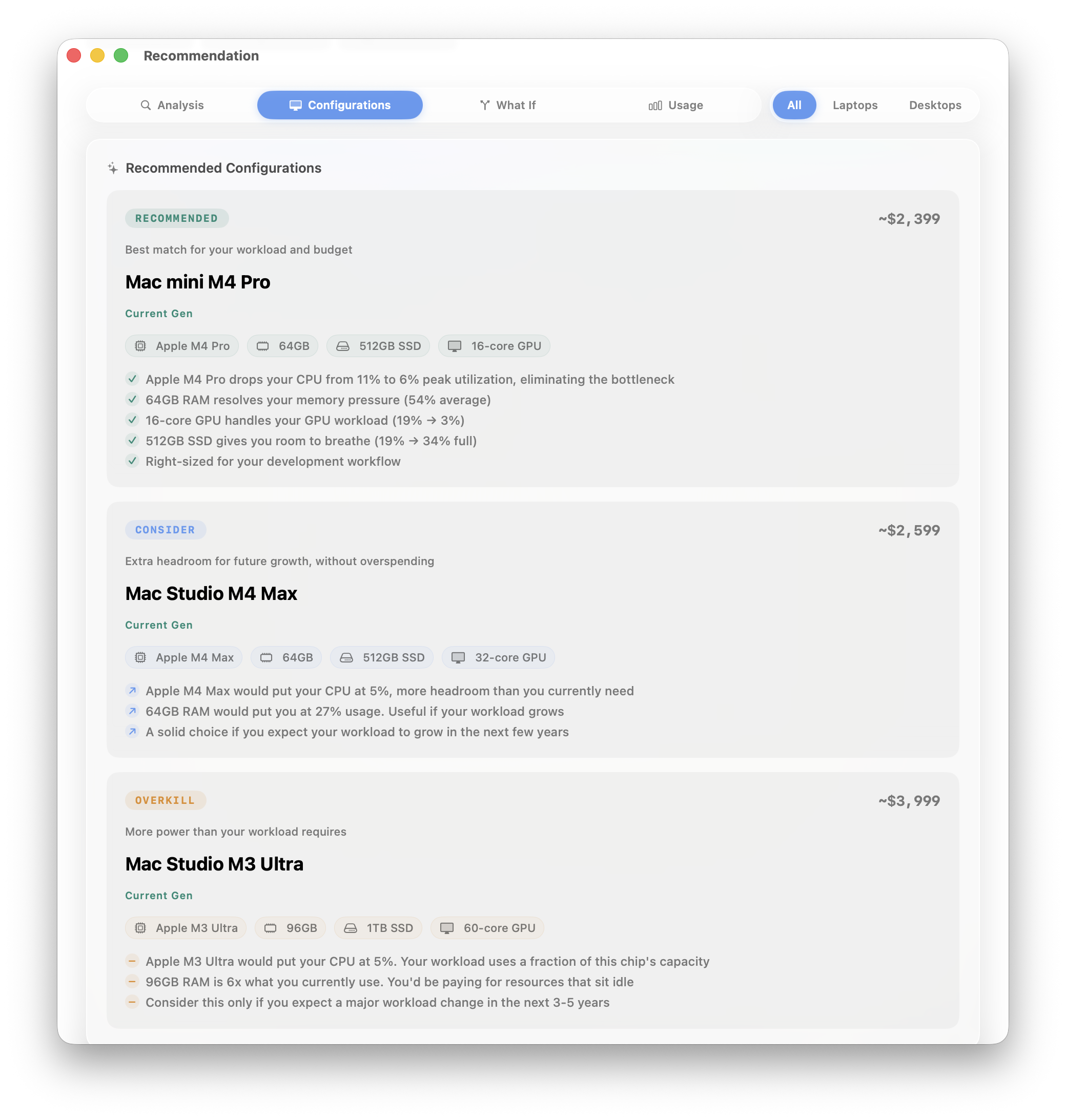
Verdict maps your real usage to current-gen Macs and picks three tiers: Recommended, Consider, and Overkill. Each one matched to your workload, not a spec sheet.

usage-matched
02

Bottleneck Detective

Finds exactly where your Mac is struggling and correlates it with the apps causing it. So you know if it's a RAM problem, a CPU problem, or just Chrome being Chrome.

app-aware
03

What-If Simulator

Pick any current Mac and see projected performance against your actual workload. Would the base M4 Air handle your workflow? Now you'll know.

interactive
04

Cost Per Bottleneck

Breaks down the dollar cost of fixing each bottleneck. See which upgrade gives you the most improvement per dollar spent.

value-focused
05

Health Score & Digest

A composite score across CPU, memory, GPU, storage, and battery. Weekly digests track trends so you can see your Mac aging in real time.

0-100 scale
06

Completely Private

Everything runs on your Mac. No accounts, no cloud, no telemetry. Built in Swift, sandboxed, and your data never leaves your machine.

local-only

Your Mac's health,
at a glance

Even if you're not shopping for a new Mac, Verdict is a powerful system monitor. It lives in your menu bar and tracks everything that matters, all day, every day.

Live Dashboard

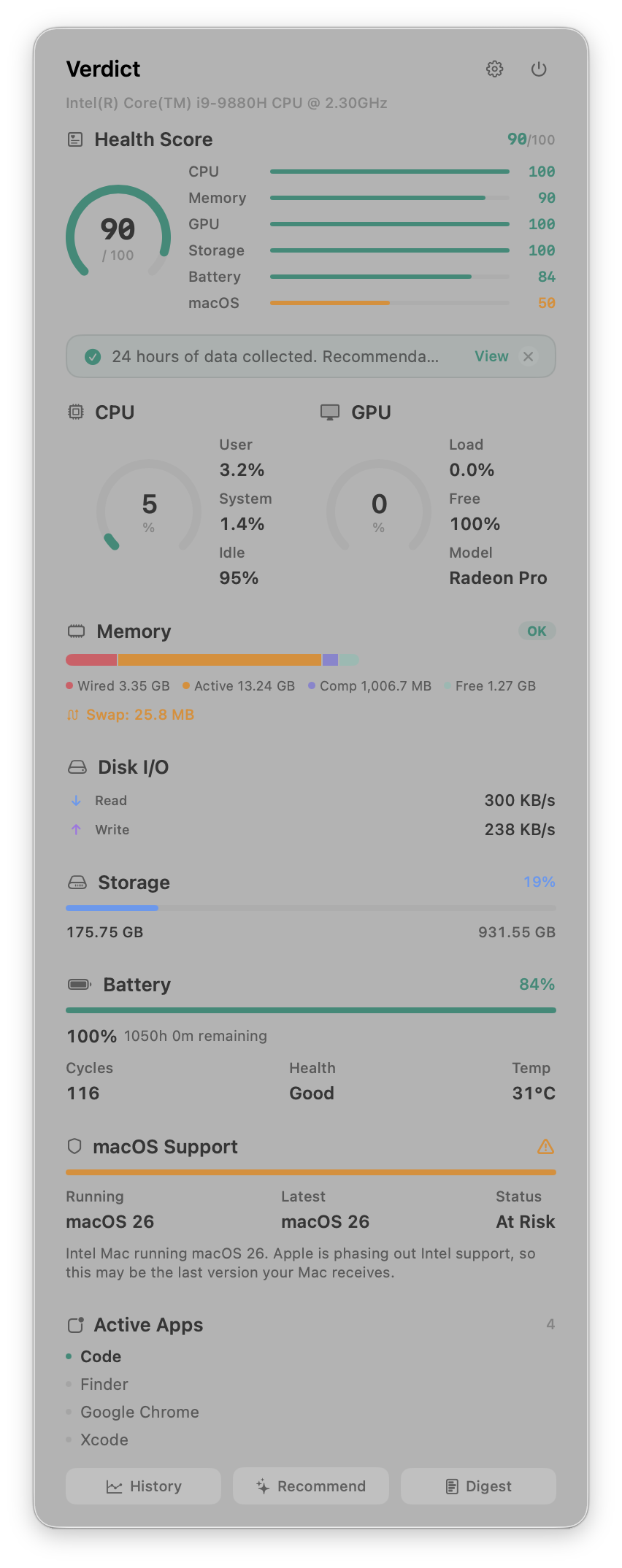
CPU, GPU, memory, disk I/O, storage, and battery, all in a compact menu bar popover. Real-time gauges updated every 30 seconds with no performance impact.

Health Score

A single 0-100 number that weighs CPU, memory, GPU, storage, battery, and macOS compatibility. Green means you're good. Amber means pay attention. Red means it's time to act.

Battery Intelligence

Tracks actual battery health using raw capacity data, not the rounded percentage macOS shows you. Detects Low Power Mode and warns if it's skewing your metrics.

Weekly Digest

Every week, Verdict summarizes your Mac's health trend, flags top resource consumers, and alerts you if your score dropped. You'll know if something changed before you feel it.

macOS Compatibility

Checks your Mac against Apple's support matrix. Apple Silicon Macs are current. Intel Macs get a clear status: supported, at risk, or unsupported, with an explanation of what that means for you.

90-Day History

Verdict stores up to 90 days of samples so you can spot trends over time. See how your Mac's performance changes with OS updates, new apps, or heavier projects.

Verdict menu bar dashboard showing health score, CPU, GPU, memory, disk I/O, storage, battery, and macOS compatibility

The menu bar dashboard

From install to answer
in one week

Verdict learns your patterns in the background. After 24 hours, early recommendations are ready. After a week, peak accuracy.

01

Install & forget

One click from the App Store. Verdict sits in your menu bar and starts learning your workload immediately.

02

Work like you always do

Verdict samples CPU, GPU, memory, disk, and battery every 30 seconds. It tracks which apps stress your hardware the most.

03

Get your verdict

Open the Recommend tab. See exactly which Mac fits your workload, which is overkill, and how much you'd save.

Lives in your menu bar

A compact dashboard that's always one click away. Built natively in Swift with zero Electron bloat.

Verdict
Verdict recommendation view showing Recommended, Consider, and Overkill Mac configurations matched to your workload

Recommended configurations matched to your actual workload

Get the verdict.

Stop guessing. Let your workload decide which Mac you actually need. Coming soon.

Coming Soon to the Mac App Store

macOS 14+ · Apple Silicon & Intel · Native Swift